Торговля: позиция, стопы, Dyn, демоTrading: position, stops, Dyn, demo
Как в стакане видны позиция и заявки, как выставлять и снимать заявки мышью и клавишами, как работают стопы.How the position and orders look in the ladder, how to place and cancel orders with the mouse and keys, how stops work.
Позиция и заявки в стаканеPosition and orders in the ladder
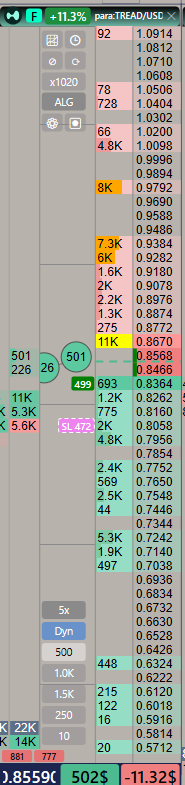 1234
1234
- Полоса позиции.Position bar. Внизу стакана, три поля: цена входа; размер в $ (зелёный — лонг, красный — шорт); PnL (зелёный — плюс, красный — минус). Щелчок по полосе переключает PnL между $ и %.At the bottom of the ladder, three fields: entry price; size in $ (green — long, red — short); PnL (green — profit, red — loss). A click on the bar switches PnL between $ and %.
- Линия входа.Entry line. Пунктир под строкой цены входа, цветом стороны позиции.A dashed line under the entry price row, in the position side colour.
- Ваши заявки.Your orders. Плашка слева от объёмов на строке цены: сумма в $, зелёная — покупка, красная — продажа. Несколько заявок на одной цене — число в скобках.A plaque left of the volumes on the price row: the amount in $, green — buy, red — sell. Several orders at one price — the count in brackets.
- Стоп.Stop. Плашка «SL» и сумма. Пунктирная рамка — стоп держит сама программа (биржа его не видит); он сработает, только пока Феникс запущен.A plaque “SL” and the amount. A dashed frame — the program itself holds the stop (the exchange does not see it); it fires only while Phoenix is running.
Внизу под кластерами и лентой — пинг до биржи в миллисекундах: зелёный — быстро, жёлтый — средне, красный — медленно.At the bottom under the clusters and tape — the ping to the exchange in milliseconds: green — fast, yellow — medium, red — slow.
Заявки мышьюOrders with the mouse
Кнопка мыши — это сторона: левая покупает, правая продаёт, в любом режиме. Объём — выбранный рабочий объём внизу стакана (в $).The mouse button is the side: left buys, right sells, in any mode. The amount is the selected working volume at the bottom of the ladder (in $).
- Левый щелчок ниже аска — лимит на покупку ровно по этой цене (в спреде тоже). На аске и выше — покупка сразу: заявка забирает стакан до цены под мышью, остаток встаёт лимиткой.Left click below the ask — a buy limit exactly at that price (inside the spread too). At the ask and above — buy at once: the order takes the book up to the price under the mouse, the rest stays as a limit.
- Правый щелчок — то же для продажи: выше бида — лимит, на биде и ниже — продажа сразу.Right click — the same for selling: above the bid — a limit, at the bid and below — sell at once.
- Каждый щелчок — ещё одна заявка рабочим объёмом. Щелчок по своей плашке её снимает (у стопа — только стопы этой цены). Средняя кнопка (колесо) — снять все заявки на этой цене.Each click is one more order of the working volume. A click on your own plaque cancels it (for a stop — only the stops of that price). The middle button (wheel) cancels all orders at that price.
- Рабочий объём: щелчок по кнопке внизу — выбрать, правый щелчок — ввести своё число.Working volume: click a button at the bottom to choose it, right-click to type your own number.
Клавиши торговлиTrading keys
Клавиши по умолчанию. Режимы «+ клик» действуют, пока клавиша нажата: зажмите клавишу и щёлкните по цене в стакане. В списке клавиш (F1) у каждого режима можно выбрать «удержание» или «фиксация» — тогда первое нажатие включает режим, второе выключает. Там же можно сменить любую клавишу.The default keys. “+ click” modes work while the key is held: hold the key and click a price in the ladder. In the key list (F1) each mode can be set to “hold” or “latch” — then the first press turns the mode on, the second off. Any key can be changed there too.
| КлавишаKey | ДействиеAction |
|---|---|
| Q / A | лимит на покупку на лучшем биде / перед нимbuy limit at the best bid / in front of it |
| W / S | лимит на продажу на лучшем аске / перед нимsell limit at the best ask / in front of it |
| 1 … 5 | выбрать рабочий объёмchoose the working volume |
| Z + клик+ click | стоп (по убыточной стороне) или тейк на всю позициюa stop (on the losing side) or a take for the whole position |
| X / Alt + клик+ click | заявка на закрытие всего остатка позиции по цене клика; кнопкой стороны позиции — доборa close order for the whole rest at the clicked price; the position-side button adds to it |
| N + клик+ click | отложенная (стоп-заявка на вход): левая — покупка выше аска, правая — продажа ниже бидаpending (stop entry): left — buy above the ask, right — sell below the bid |
| F | CLOSE: снять заявки монеты и закрыть позициюCLOSE: cancel the coin’s orders and close the position |
| U | стоп в безубытокstop to break-even |
| R | развернуть позициюreverse the position |
| Space / B | снять лимитки / стопы этой монетыcancel this coin’s limits / stops |
| P / NumPad7 / O | снять все лимитки / все стопы / все заявкиcancel all limits / all stops / all orders |
| Enter | синхронизировать позицию с биржейsync the position with the exchange |
| K + клик+ click | сигнальный уровень 🔔 (ещё раз по нему — снять)an alert level 🔔 (again on it — remove) |
| L / I | уровень под мышью / стереть все уровниa level under the mouse / erase all levels |
| Y | линейка: от цены до мыши — %, сумма, PnLruler: from the price to the mouse — %, amount, PnL |
Стопы, тейк, безубытокStops, take, break-even
Ручной стоп или тейк — клавиша Z + щелчок по цене (раздел выше). Безубыток — клавиша U. Автоматические стопы задаются в ⚙ стакана → «Стоп и тейк» и «Трейлинг-стоп».A manual stop or take — Z + click on a price (section above). Break-even — the U key. Automatic stops are set in the ladder ⚙ → “Stop and take” and “Trailing stop”.
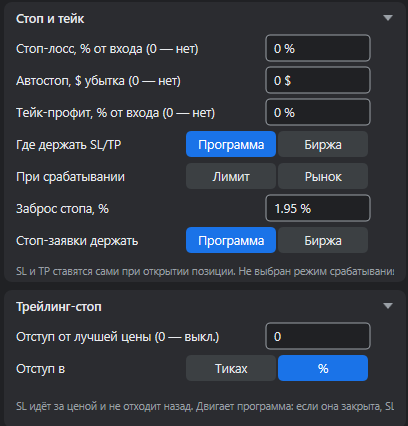
- Стоп-лосс, % от входа — стоп ставится сам при открытии позиции на таком расстоянии от входа. 0 — не ставить.Stop loss, % from entry — the stop is placed by itself when a position opens, this far from the entry. 0 — none.
- Автостоп, $ убытка — стоп там, где убыток позиции достигнет этой суммы. 0 — не ставить.Auto-stop, $ of loss — a stop where the position loss reaches this amount. 0 — none.
- Тейк-профит, % от входа — тейк на всю позицию на таком расстоянии от входа. 0 — не ставить.Take profit, % from entry — a take for the whole position this far from the entry. 0 — none.
- Где держать SL/TP: Программа — стоп хранит и исполняет Феникс (биржа его не видит, срабатывает только пока программа запущена; в стакане — пунктирная рамка). Биржа — стоп-заявка стоит на бирже и сработает, даже если компьютер выключен.Where to keep SL/TP: Program — Phoenix keeps and fires the stop (the exchange does not see it; it works only while the program runs; a dashed frame in the ladder). Exchange — the stop order sits on the exchange and fires even if the computer is off.
- При срабатывании: Рынок — закрыть по рынку. Лимит — лимитной заявкой не дальше «заброса» от цены стопа.On trigger: Market — close at market. Limit — with a limit order no further than the “slip” from the stop price.
- Заброс стопа, % — насколько дальше цены стопа может исполниться лимит при срабатывании (по умолчанию 1,95 %).Stop slip, % — how far beyond the stop price the limit may fill on trigger (default 1.95 %).
- Стоп-заявки держать — то же «Программа / Биржа» для отложенных заявок (N).Keep stop orders — the same “Program / Exchange” for pending orders (N).
- Трейлинг-стоп: стоп идёт за ценой на заданном отступе (в тиках или %) и не отходит назад. Двигает его программа: если она закрыта, стоп остаётся там, где был последний раз. 0 — выключено.Trailing stop: the stop follows the price at the set offset (in ticks or %) and never moves back. The program moves it: if it is closed, the stop stays where it last was. 0 — off.
Отложенные заявки и средняя ценаPending orders and average price
Отложенная (N + щелчок) — стоп-заявка на вход: левой кнопкой — покупка выше аска (сработает, когда цена дойдёт), правой — продажа ниже бида. В ⚙ → «Отложенные (N)» — исполнять лимитом или по рынку и заброс, как у стопа.Pending (N + click) — a stop entry: left button — a buy above the ask (fires when the price reaches it), right — a sell below the bid. In ⚙ → “Pending (N)” — fill by limit or market and the slip, as for a stop.
Средняя цена (кнопка Fix / Dyn / F / L внизу стакана, глава 4): Fix — вход и PnL по оставшейся позиции; Dyn — безубыток всей сделки с уже закрытыми частями и комиссиями, размер позиции — деньги в сделке; F / L — частичные закрытия снимают первые / последние входы.Average price (the Fix / Dyn / F / L button at the bottom of the ladder, chapter 4): Fix — entry and PnL of the remaining position; Dyn — break-even of the whole trade with closed parts and fees, the size is the money in the trade; F / L — partial closes take off the first / last entries.
Позиция → «Пыль»: остаток монеты на споте дешевле порога (в $) не считается позицией и не входит в новую сделку.Position → “Dust”: a spot coin rest cheaper than the threshold (in $) is not a position and does not enter a new trade.